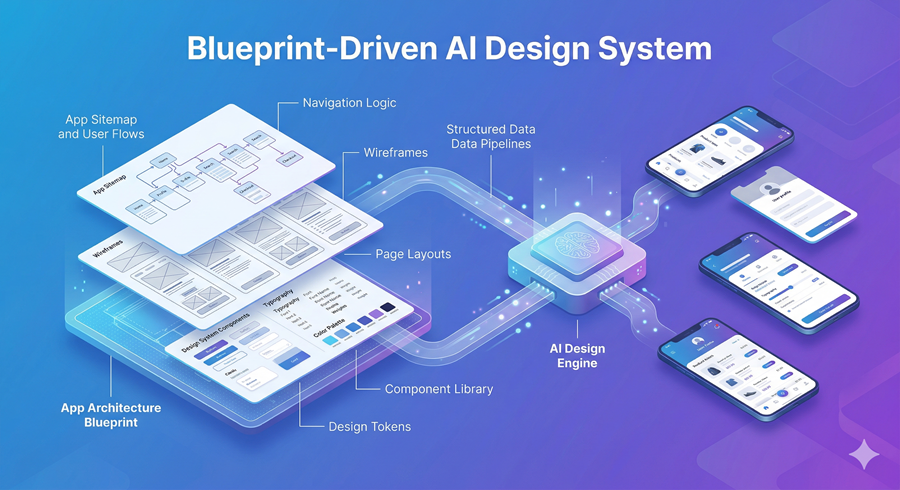
I have always liked using Figma, but once I started exploring its AI features seriously, I realized something important. Most people are either underusing them or using them incorrectly. The problem is not the tool. It is how we approach it.
AI in Figma is powerful, but it is not magic. If I just throw a messy prompt at it and expect a perfect app, the results fall apart quickly. The difference between a broken prototype and a clean, usable design comes down to structure and planning.
Why Prompting Alone Doesn’t Work
When I first tried generating designs using AI, I made a common mistake. I dumped everything into one massive prompt. Pages, features, colors, flows, all in one go. The result looked impressive at first glance, but it was unusable.
The layout lacked structure, the pages were inconsistent, and the logic behind the app did not hold together. Since the system is generating code behind the scenes, it needs clarity. Without structure, it simply cannot build something functional.
That is when I realized that AI reflects my thinking. If I am unclear, the output will be unclear too.
The Real Shift Is in Planning
Now, I spend most of my time planning before I even open Figma. I brainstorm the app idea using an AI assistant, defining the target users, core features, and overall goal. This step gives me a clear direction instead of vague ideas.
Once I finalize that, I move into a structured workflow. First, I generate a complete app overview. Then I define the architecture, mapping out every page and how they connect. Finally, I create a design system, including colors, typography, and style guidelines.
This changes everything. Instead of guessing, the AI now has a blueprint.
Turning Structure Into Real Designs
After preparing everything, I combine all outputs into one organized prompt. This becomes the foundation for generating the design.
When I run this through Figma AI, the difference is obvious. The layouts are consistent, the structure makes sense, and the prototype actually works. It is no longer just a visual mockup. It feels like a real product.
The responsiveness improves, dark mode works properly, and navigation flows logically. That only happens because the system understands the full context.
From Design to Working Application
What I find even more interesting is what happens next. The generated output is not just design; it is structured code. That makes it much easier to turn into a real application.
With the help of an AI coding agent, I can convert the design into a full-stack app. The agent handles repetitive tasks, organizes components, and even builds a basic backend using mock data.
Instead of starting from scratch, I am now refining something that already works. This saves a huge amount of time and effort.
Why Context Is Everything
I also learned that context is the most important factor when working with AI. Whether it is design files, UI components, or external libraries, feeding the right context into the system dramatically improves results.
When the AI understands the structure, assets, and rules, it produces outputs that are far closer to real-world quality. Without that context, even the best models struggle.
Short Paragraph
What changed for me was realizing that AI is not replacing the design process; it is amplifying it. The better I plan and structure my ideas, the better the results become. Figma AI is powerful, but only if I treat it like a system that needs clarity, not a shortcut that skips thinking.