
The UI and UX Mistakes That Are Killing Enterprise AI Product Adoption in the US
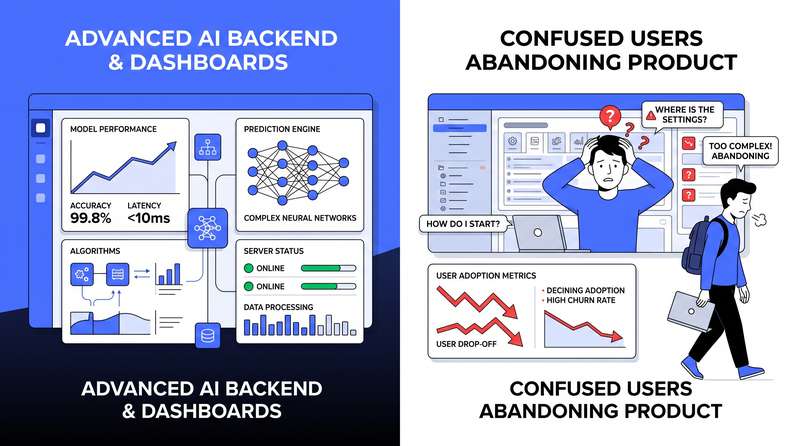
A US enterprise invests months and significant budget building an AI-powered product. The underlying models are excellent. The accuracy is strong. The backend engineering is solid. The product launches. And then almost nobody uses it. This scenario plays out with alarming frequency across US enterprise AI deployments, and the root cause is almost never the AI – it is the interface. Mistake One: Hiding the AI Some enterprise teams design interfaces that give users no indication that AI is involved in generating their outputs. Users who do not know an AI generated something do not know to verify it. They do not understand why output varied from yesterday’s output on the same input. Transparency about AI involvement does not require exposing technical details – it requires giving users enough context to interpret outputs appropriately. Mistake Two: Designing for the Best Case The five most common UI/UX mistakes that kill enterprise AI adoption Most enterprise AI interfaces are designed for the happy path – polished and thoughtfully designed when the AI produces a correct, confident, well-formatted output. Everything else is an afterthought. Production AI interfaces need explicit design for low-confidence outputs, error states that communicate meaningfully without technical jargon, fallback experiences when the AI cannot handle a specific input, correction workflows allowing users to provide feedback without breaking their flow, and escalation paths for situations the AI handles poorly. Mistake Three: Removing User Control in the Name of Simplicity AI outputs in enterprise contexts frequently need to be reviewed, edited, approved, or discarded. Users need the ability to correct AI errors, adjust outputs to fit their specific context, and override AI recommendations when their judgment differs. Interfaces that do not provide this control force users to work around the system rather than with it – and they will choose workarounds every time. Mistake Four: Inconsistent Loading and Response Patterns The most damaging pattern is inconsistency – an interface that sometimes shows a loading indicator and sometimes does not, that sometimes streams responses and sometimes displays them all at once, produces an experience that feels unreliable even when the underlying system is performing correctly. Users can adapt to slow systems. They cannot adapt to unpredictable ones. The design principles shared by enterprise AI interfaces that achieve strong adoption What Good AI Interface Design Actually Looks Like Enterprise AI interfaces that achieve strong adoption are transparent about AI involvement and its limitations without being technical or alarming. They maintain user control at the moments that matter most. They handle errors and edge cases as first-class design scenarios, not afterthoughts. They communicate latency and processing states consistently and predictably. And they are designed for the median user under real working conditions, not the ideal user in a demo scenario.
Why We Still Choose Next.js for AI Applications in 2026 and Why You Should Too
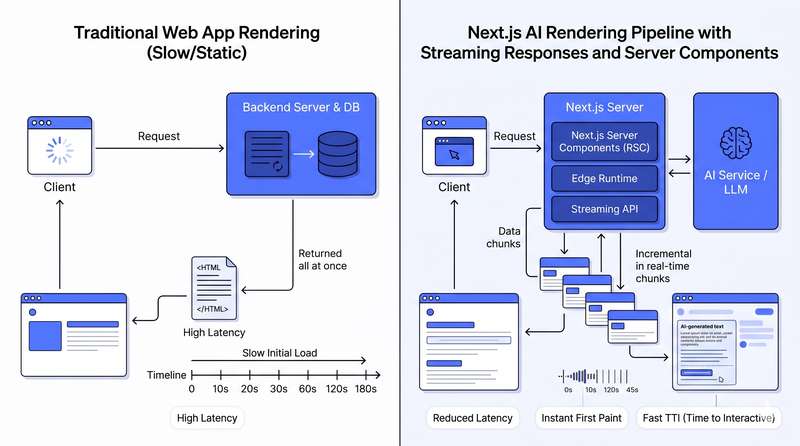
New frameworks emerge regularly, each promising to be better suited to modern AI-integrated development. Despite this, Next.js remains our default recommendation for US enterprises building AI-powered web applications – and the reasons are more nuanced than familiarity or inertia. What AI Applications Actually Demand From a Framework Building AI into a web application changes the fundamental performance and architectural requirements in ways that expose weaknesses in frameworks not designed for these demands. Streaming – LLM responses are generated token by token, and waiting for the entire response before displaying anything produces an unacceptably slow experience. Server-side AI processing matters for performance and security – making AI model calls from the browser exposes API keys and creates latency. Edge deployment is increasingly important where reducing latency between the user and the processing layer directly improves experience. The specific Next.js features that make it well-suited for AI application development in 2026 Why Next.js Handles These Demands Well Server Components allow AI processing to happen on the server with zero JavaScript shipped to the client. Streaming Server Components and Suspense enable progressive rendering of AI-generated content with loading states handled natively. Route Handlers provide a clean way to build backend AI endpoints within the same codebase as the frontend. Edge Runtime support allows specific API routes to run at the edge, reducing latency for AI-integrated endpoints serving users globally. Vercel AI SDK integration provides first-class support for building streaming AI interfaces with pre-built UI components. How Next.js compares to its real alternatives for AI application development Addressing the Real Alternatives Remix offers excellent progressive enhancement but has a smaller ecosystem of AI-specific tooling. SvelteKit produces smaller bundle sizes with an excellent developer experience but has a smaller enterprise adoption base. The honest answer is that a well-built application on any of these frameworks will outperform a poorly built one on Next.js. The reason we recommend Next.js as a default is that its ecosystem, AI tooling, deployment options, and community make it the path of least resistance to a well-built AI application in 2026.
AI-Powered Web Applications vs Traditional Builds: What the Performance Gap Looks Like
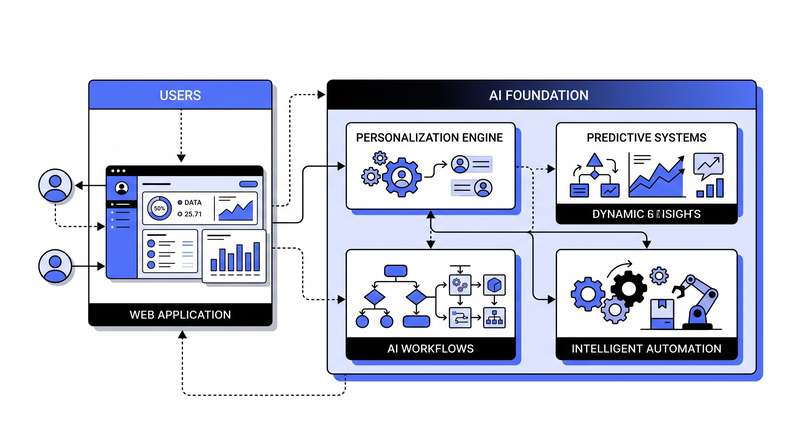
There is a meaningful difference between applications that use data to improve user experience incrementally and applications built from the ground up with AI as a core architectural component. That difference – in user engagement, conversion, and operational efficiency – is becoming one of the clearest competitive divides in US enterprise software. What Makes a Web Application Truly AI-Powered A genuinely AI-powered web application is one where machine intelligence is woven into the core user flows, backend processing, and decision logic. Characteristics include dynamic personalization that adapts the interface and content to individual user context in real time, intelligent automation that handles complex processing without human intervention, natural language interfaces allowing users to interact through conversation rather than menus, and predictive features that anticipate user needs before they are explicitly requested. Where AI-powered web applications consistently outperform traditional builds in key metrics Where the Performance Gap Comes From User engagement increases when applications adapt to individual users rather than presenting a one-size-fits-all experience. Conversion rate improvements in AI-powered e-commerce and lead generation applications range from 15 to 40 percent depending on the baseline and implementation quality. Operational efficiency gains come from the automation of processes that would otherwise require human intervention – customer service handling, document processing, and data enrichment workflows that previously required manual effort can be automated end-to-end. The Next.js and Node.js Foundation We build AI-powered web applications primarily on a Next.js and Node.js stack. Next.js provides server-side rendering capabilities critical for AI-powered applications where personalization needs to be rendered on the server to avoid layout shifts. Node.js provides the non-blocking I/O architecture particularly well-suited to AI application patterns where multiple concurrent model calls, streaming responses, and real-time processing are common requirements. The three integration challenges that separate well-built AI applications from poorly integrated ones